Accessing the Setup Guide
To access the Setup Guide, you must be logged into your Rithum account. Once you’ve logged in, if it’s your first connection, you’ll first be redirected to agree to Rithum’s Terms of Service.
Once you complete the contract terms, you’ll be directed to the Setup Guide.
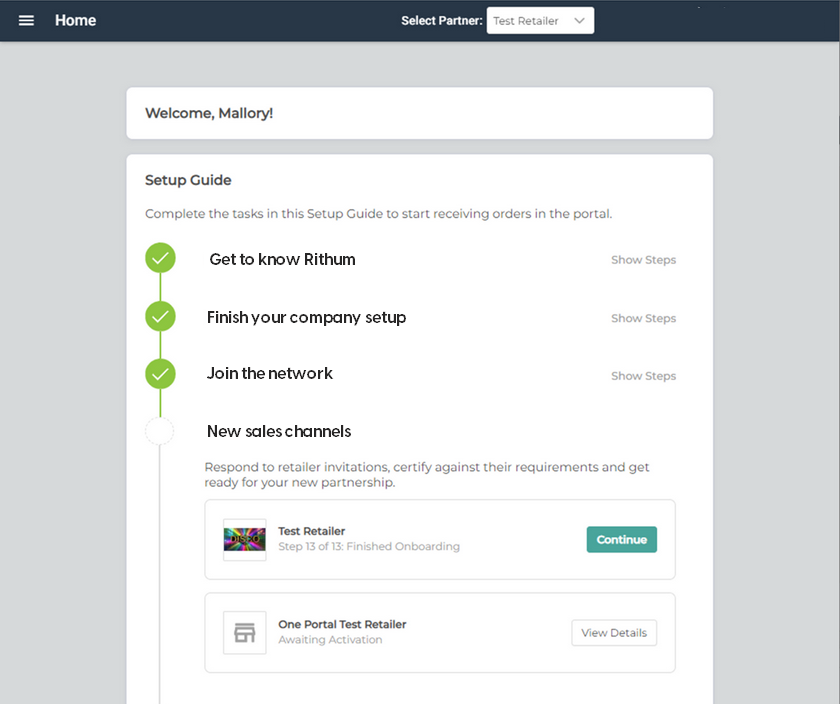
Completing the Setup Guide
To complete onboarding for your new trading partner, you must meet both the system and your trading partner’s requirements in each of the following steps within the Setup Guide. Your steps may vary based on your trading partner’s requirements.
Section 1: Get to know Rithum
Learn what you can do in the web application by walking through common scenarios for inventory and order fulfillment.
Section 2: Finish your company setup
Complete company details for your new retail trading partner relationship. Details include adding users, setting up contacts, and adding warehouse locations.
Section 3: Join the network
Complete tasks to join the Rithum network and review best practices/guidelines to maximize your performance on the network.
Section 4: New sales channels
Formally accept your invitation to connect to your trading partner. You’ll perform all of the core setup and testing tasks against your trading partner’s business rules and validations by going through a series of steps and scenarios:
- How to get started
- Configure initial settings
- Pricing agreement
- Make payment
- Supply warehouses
- Loading items and inventory
- Update inventory
- Submit catalog
- Creating test orders
- Acknowledging orders
- Shipping an order
- Cancelling an order
- Submit multi-line order
- Invoicing orders
- Handling returns
- Next steps
Note: At any time, you can resume your progress within the Setup Guide by clicking the yellow bar. To move your account into production, you must first complete all steps in the Setup Guide and submit payment for the required setup fee. Once these are complete and your trading partner has moved your account into production, the yellow bar will no longer be displayed.
Section 5: Complete certification
Complete all remaining tasks to become Network Certified.
Next steps
Once your account has been moved into production by your trading partner, be sure to:
1. Sign up for notifications.
2. Ensure your inventory is up to date.
3. Be ready to fulfill your first order.